AI-assisted storyboard-to-Canvas workflow
A four-stage evolution of how storyboards become Canvas content — from a snippet-level Custom GPT, to a Claude Project handling full storyboard sections, to a Make integration that pushed converted pages into Canvas, and now to a Cowork workflow using a Claude Skill to support the build end-to-end. What changed wasn't only speed; it was moving fragmented production work into one connected workflow and creating more space for focused QA.
Project overview
A workflow I built to turn instructional storyboards into Canvas-ready content — from the original manual copy-paste process to today's connected production workflow.
It evolved over four stages: a Custom GPT for snippet-by-snippet conversion during the early uplift work on the King's College London programmes; a Claude Project that converted whole storyboard sections into markup (still pasted into Canvas by hand); a Make integration that pushed the Claude-converted pages into pre-created Canvas pages by matching slugs; and now, a Cowork workflow using a Claude Skill that supports the build end-to-end — pages, assignments, quizzes, images, and embeds — from a Google Workspace storyboard into Canvas.
The most useful outcome was not speed alone. It was reducing fragmented production work so that more attention could go into QA, consistency, and the quality of the content before release.
Key features & outcomes
- Designed and built a four-stage AI-assisted workflow, evolving from snippet-level HTML conversion to a connected storyboard-to-Canvas production workflow
- Converted full storyboard sections into Canvas-ready markup, including page slugs, glossary hyperlinks, banner variants, and consistent page structures
- Built a slug-matched Make integration that transferred Claude-converted pages into pre-created Canvas LMS pages, then replaced it when a more integrated workflow became viable
- Moved the build process into Cowork with a purpose-built Claude Skill, supporting Canvas pages, assignments, quizzes, images, and embeds from a Google Workspace storyboard
- Reduced repetitive copy-paste production work and created more space for fresh-eyes QA before content went live
- Designed the workflow for ongoing uplift work on the King's College London programmes
The challenge was to move repetitive Canvas production work out of my hands and create more space for quality review.
Building and updating course content in Canvas involves a lot of manual assembly: converting storyboard content into HTML, creating or updating pages, pasting content, checking formatting, replacing media, fixing embeds, and repeating the same steps across multiple pages.
The work is not complex once the pattern is known, but it is time-consuming and mentally draining at scale. It also creates a quality problem. By the time the content is ready for review, I have already handled it multiple times, which makes fresh-eyes QA harder.
The Custom GPT I built solved part of this by converting structural tags like accordion or resources into reusable HTML snippets. That saved typing, but it did not change the shape of the work. The build was still page-by-page, and the manual Canvas assembly still sat with me.
What I needed was a workflow that delegated the repetitive build layer to AI — pages, media, embeds, and structure-matched content — so I could focus on the work that still needs human judgement: module structure, accessibility, consistency, QA, and release.
Each stage took a few weeks to build once the right tools were available. The multi-year arc is the gap between stages, not the build time.
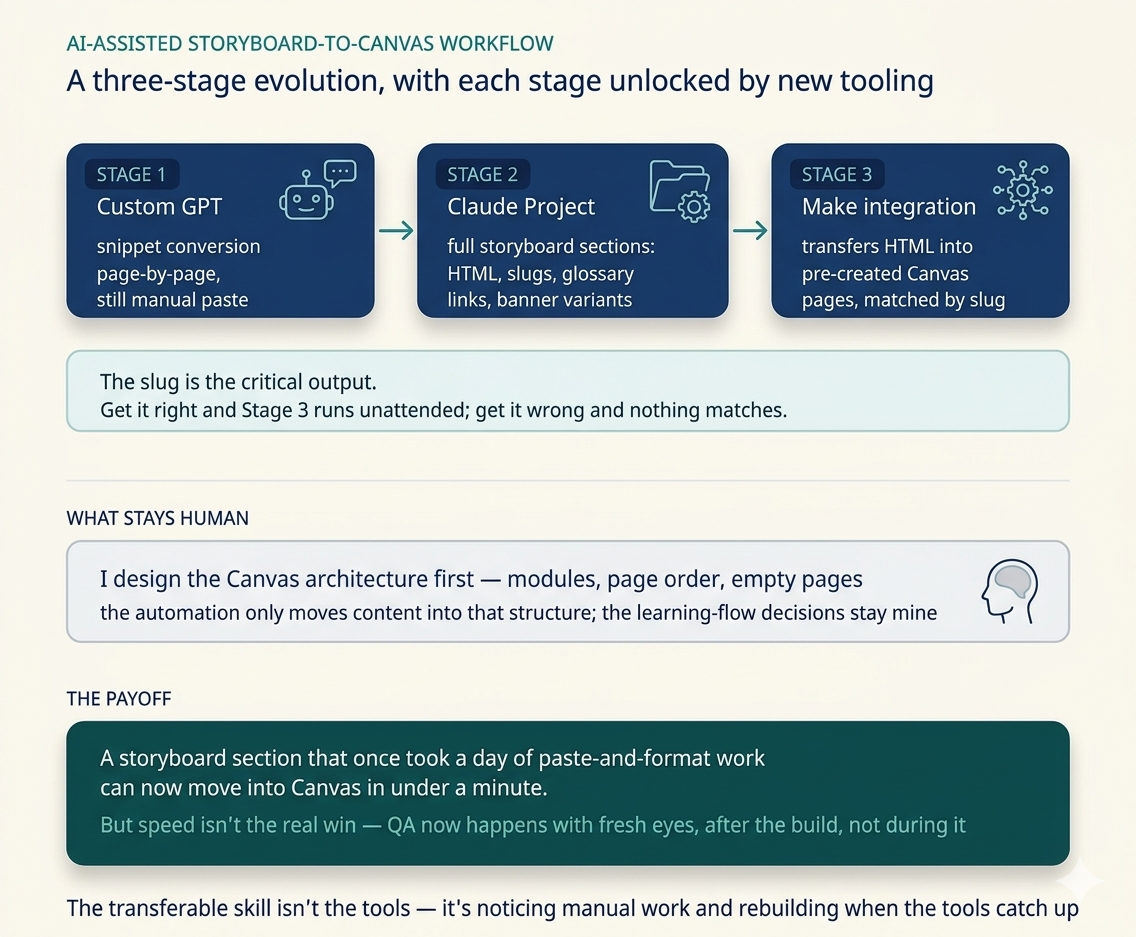
Stage 1 — Custom GPT for snippet conversion (early 2024). Built during the early uplift phase on the KCL programmes, after the active build had wrapped. The GPT recognised structural tags in storyboards and returned the matching HTML snippet. It saved typing but didn't change the shape of the work — still page-by-page, still followed by manual paste.
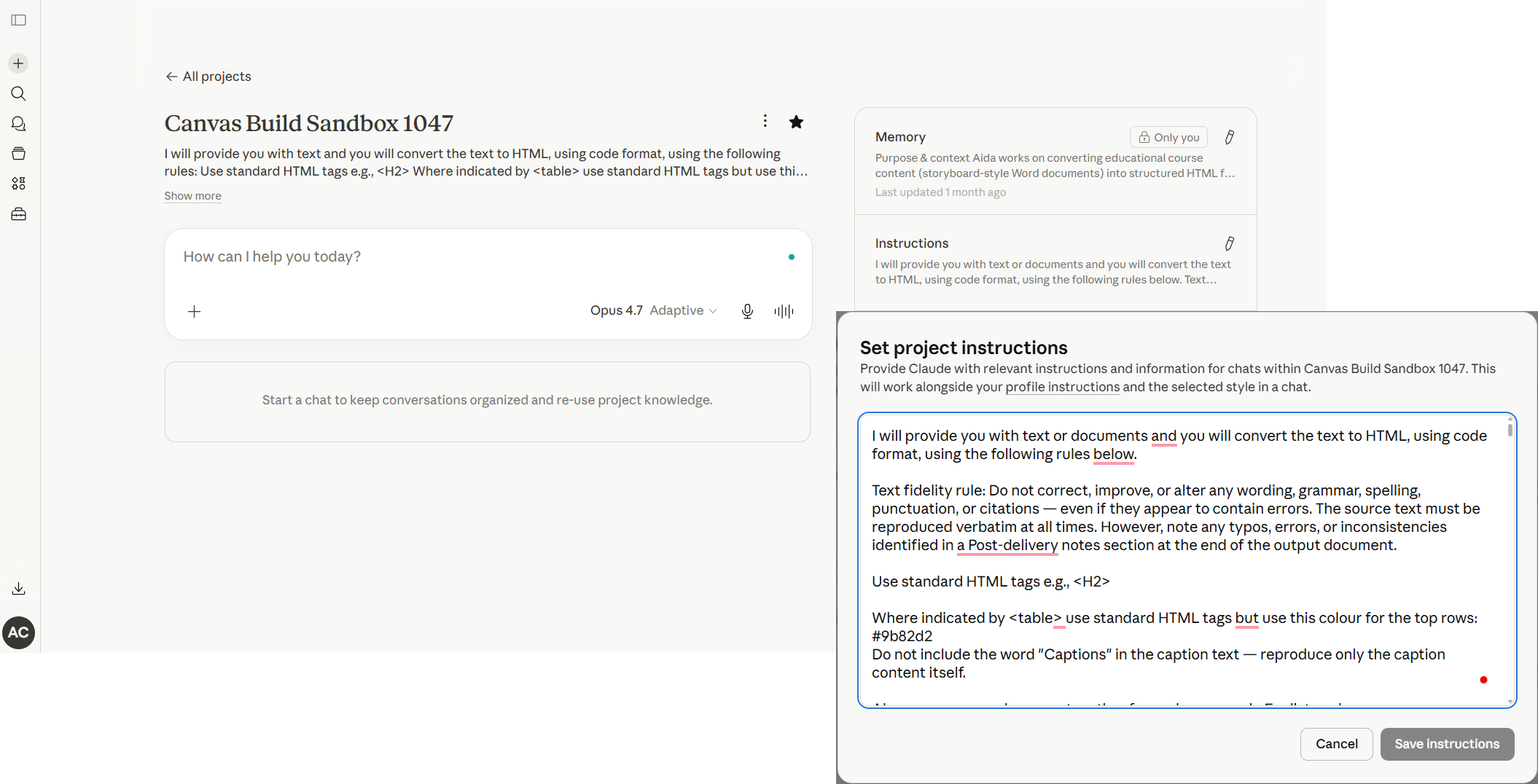
Stage 2 — Claude Project for section-level conversion (mid-2025). Migrated the conversion to a Claude Project. Claude handled code output more reliably than ChatGPT for structured HTML, and Projects let me load the storyboard format and conversion rules into a persistent workspace. Instead of one page at a time, the Project converted full storyboard sections into markup: HTML for every page, a page slug for each page (the critical output), glossary hyperlinks woven into the prose, banner variants for different page types, and consistent structure across the section. The paste into Canvas was still manual.
The slug generation sounds dull and it's the most important output. Get the slug right and the next stage can run unattended. Get it wrong and nothing matches.
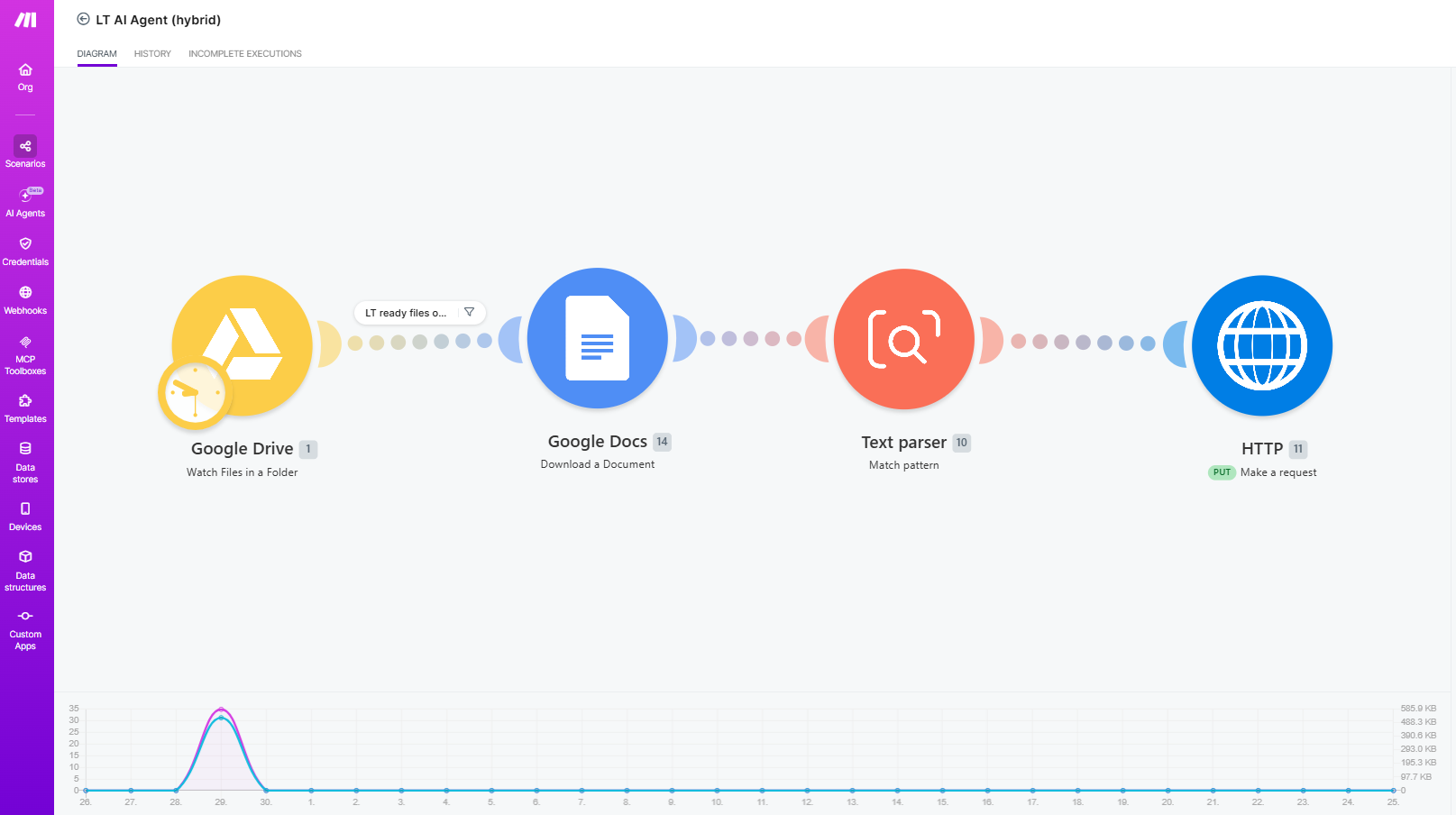
Stage 3 — Make integration with Canvas (Jan–Mar 2026). Automated the transfer step. A Make scenario picked up the Claude-converted storyboard from Google Drive, parsed it into individual pages, matched each page to a pre-created empty Canvas page by slug, and transferred the HTML into the right slot. The pre-created empty Canvas pages step mattered — I still set up the module structure in Canvas first. The automation handled the content transfer, not the structure.
The Make step worked, but it was clunky. The two-tool handoff meant every run had two places something could go wrong. And Make could only transfer pages — assignments, quizzes, images, and embeds each still needed separate handling. What had been a manual paste for one artefact type became a manual patch across several.
Stage 4 — Cowork with a Claude Skill (from April 2026). Moved the build process into Cowork, using a Claude Skill I built for this pipeline. The Skill acts as a persistent set of instructions and templates, so the storyboard format, conversion rules, and Canvas conventions are loaded at the start of each session. Cowork connects to Google Workspace to read the storyboard and to Canvas via the browser connector to build the required artefacts: pages, assignments, quizzes, images, and embeds. Final QA and release remain human-led, but the repetitive production layer now sits inside one connected workflow.
A storyboard section that once took a day of paste-and-format, and later a two-tool Claude + Make handoff, now runs as an end-to-end production build from Drive into Canvas — with QA and release remaining the human step.
Where to put the AI. For most of the arc, putting AI at the front of the pipeline — convert the storyboard, then automate the transfer — was more effective than scattering AI across multiple steps. One concentrated AI step, one reliable automation step, clear handoff between them. The Cowork stage collapses that further: one environment, one Skill, one run.
What not to automate. The pre-created Canvas module structure was intentionally a human decision — module ordering, page types, learning flow. Putting that under AI would have made the workflow brittle and harder to QA. That hasn't changed; the Cowork Skill builds inside the structure I set up, not the structure itself.
The QA point. I built this for speed and what I got back was attention. By the time content lands in Canvas now, I haven't been staring at it for hours. The QA pass catches things the previous workflow missed simply because I'm not exhausted by the production phase.
Workflow tools age fast — and now, faster. The 2024 Custom GPT was useful at the time and ordinary a year later. The Make integration was current in January 2026 and superseded by April. The transferable skill is not the specific tool stack; it is recognising where manual production work is slowing things down, designing a better workflow, and being willing to rebuild when the tools catch up.